
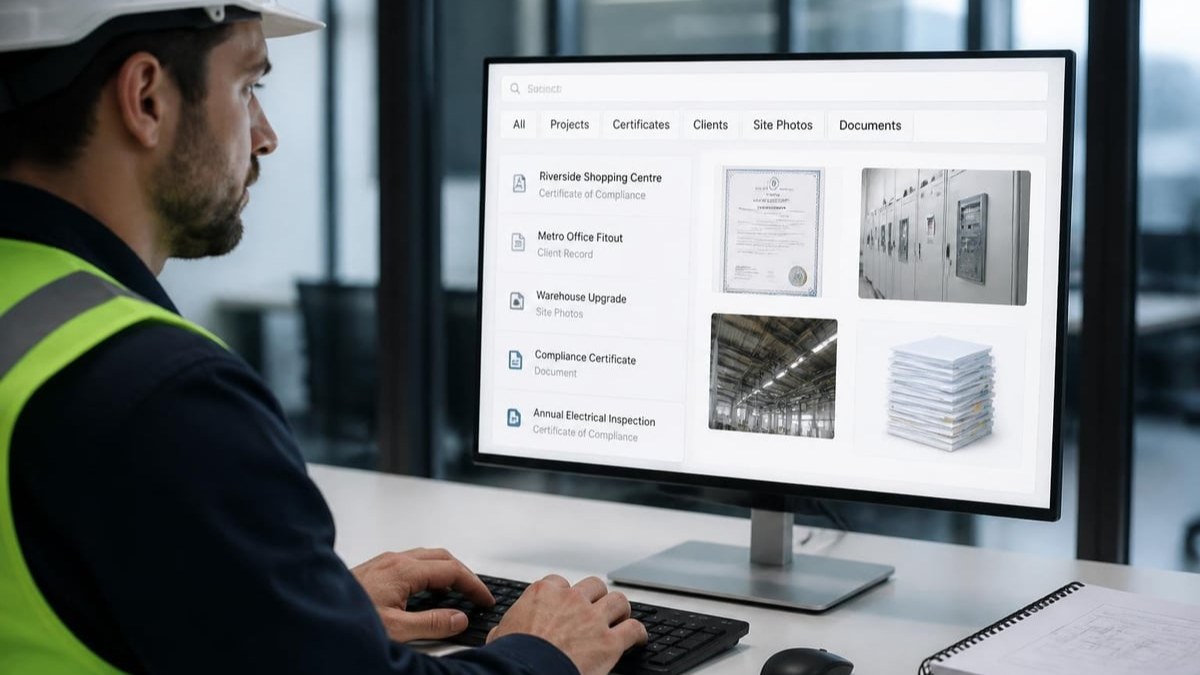
The ability to locate information quickly can make or break efficiency in electrical compliance work. When you're juggling multiple projects, client requirements, and regulatory documentation, searching everything across your digital workspace needs to be seamless. For electricians managing Certificates of Compliance and project documentation, the difference between a two-minute search and a twenty-minute hunt translates directly into billable hours and client satisfaction.
The Challenge of Fragmented Digital Information
Modern electrical contractors work with information scattered across multiple platforms. Project specifications live in email attachments, compliance certificates sit in cloud storage, client details hide in spreadsheets, and installation photos rest on mobile devices.
This fragmentation creates a significant productivity drain. Every search requires opening multiple applications, remembering where you saved which document, and piecing together information from disparate sources. The cognitive load alone reduces your capacity for the actual technical work that generates revenue.
Why Traditional Search Falls Short
Standard computer search functions weren't designed for compliance-focused industries. They index file names and some content, but they struggle with:
- Context-specific metadata such as installation addresses or certificate numbers
- Handwritten notes captured during site inspections
- Images and photos containing critical compliance information
- Version control when multiple drafts exist
- Relationship mapping between projects, clients, and certificates
When you're searching everything in your workspace, you need tools that understand the unique structure of electrical compliance documentation. A system that recognizes "Sandton office refit" should surface not just the project folder, but the associated Certificate of Compliance, client communications, and installation photographs.
Building a Searchable Digital Foundation
The effectiveness of searching everything depends heavily on how you organize information from the outset. Implementing consistent folder structures and naming conventions forms the backbone of efficient retrieval.
Essential Organizational Principles
Hierarchical folder structures provide predictable locations for different document types. Consider organizing by:
- Client name or company
- Project or site location
- Document type (certificates, quotes, correspondence)
- Date or project phase
Consistent naming conventions eliminate ambiguity. A certificate named "CoC_JohansenResidential_Sandton_2026-07-15.pdf" tells you immediately what it contains, who it's for, and when it was created.
Metadata enrichment adds searchable attributes beyond the filename. Tags, categories, and custom fields make searching everything more precise. Instead of scrolling through hundreds of files, you can filter by certificate status, installation type, or compliance standard.
| Organizational Element | Benefit for Search | Implementation Effort |
|---|---|---|
| Folder hierarchy | Reduces search scope by 60% | Medium |
| Naming conventions | Improves relevance by 75% | Low |
| Metadata tagging | Enables precision filtering | High |
| Full-text indexing | Finds content within documents | Medium |
The Energy Warehouse platform addresses these organizational challenges by automatically structuring Certificates of Compliance with built-in metadata fields, ensuring that every certificate contains searchable information about the installation, client, and compliance requirements. This systematic approach to data capture eliminates the guesswork from future searches.
Advanced Search Techniques for Compliance Documents
Searching everything effectively requires mastering both basic and advanced search operators. These techniques transform vague queries into precision instruments.
Boolean and Proximity Operators
AND operators narrow results by requiring multiple terms. Searching "Sandton AND commercial AND 2026" returns only documents containing all three elements.
OR operators expand results by accepting any listed term. "Certificate OR CoC OR compliance" captures documents using different terminology.
Proximity searches find terms within a specified distance of each other. This proves invaluable when searching everything related to a specific installation type at a particular location.
Wildcard and Filter Strategies
Wildcards accommodate variations in spelling or naming. Searching "Johan*" finds Johansen, Johannsen, and Johan. Question marks replace single characters, whilst asterisks replace multiple characters.
Filters refine results by attributes:
- Date ranges for recent projects
- File types for PDFs versus images
- Modified date for tracking recent changes
- Size parameters for identifying detailed specifications
Digital file management best practices emphasize the importance of combining organizational structure with powerful search capabilities to maximize productivity.

Platform-Specific Search Capabilities
Different platforms offer varying search functionalities. Understanding these capabilities ensures you're searching everything your system can deliver.
Cloud Storage Search Features
Cloud platforms index file contents, making searching everything within documents possible. Google Drive searches inside PDFs, Office documents, and even scanned images with OCR. Dropbox offers similar functionality with full-text search across stored files.
However, cloud platforms often lack industry-specific intelligence. They don't inherently understand that a SANS 10142-1 certificate relates to electrical compliance, or that an installation address connects to multiple site visits and documentation sets.
Mobile Search Optimization
For electricians working on-site, mobile search capabilities determine whether you can access critical information whilst standing in front of a distribution board. Effective mobile search requires:
- Offline access to recently viewed documents
- Voice search for hands-free operation
- Quick filters optimized for small screens
- Synchronization between mobile and desktop searches
The ability to use voice-to-text for searching everything whilst wearing safety equipment or holding tools significantly improves site productivity. As discussed in how electrical contractors can eliminate paperwork forever, digital platforms with robust mobile search transform field operations.
Search Performance and User Behavior
Research on file management and search behaviors reveals that professionals spend an average of 2.5 hours per week searching for information. For electrical contractors managing multiple projects, this figure often exceeds four hours weekly.
Common Search Challenges
Users frequently struggle with:
Recall versus recognition - remembering exact file names proves difficult, but recognizing the right document when you see it comes naturally. Effective search systems present preview snippets and thumbnails to aid recognition.
Vocabulary mismatch - you might search for "electrical certificate" whilst the document is titled "CoC" or "compliance documentation". Synonym support and custom keyword mapping address this challenge.
Context switching - moving between search and work disrupts concentration. Integrated search within your primary workflow maintains focus.
| Search Challenge | Impact on Productivity | Solution Approach |
|---|---|---|
| Poor recall of filenames | 45 minutes weekly wasted | Visual previews and thumbnails |
| Vocabulary mismatch | 30% failed searches | Synonym mapping and tags |
| Context switching | 15% productivity loss | In-app integrated search |
| Unclear results ranking | 40% irrelevant clicks | Custom relevance algorithms |
Optimizing Search Habits
Developing efficient search habits compounds productivity gains over time. Start searches with specific terms, then broaden if necessary. Use recent file lists for frequently accessed documents. Bookmark complex search queries for repeated use.
Understanding web searching tools and their capabilities helps you leverage the right tool for each search task, whether you're searching everything in your local system, cloud storage, or across the web for compliance guidelines.
Implementing Search-First Workflows
Rather than treating search as a fallback when browsing fails, design workflows around search as the primary navigation method. This paradigm shift dramatically improves efficiency when searching everything in your digital workspace.
Search-Driven Project Management
Begin each project interaction with search, not navigation. Instead of clicking through folders to find a client's certificate, search directly for the client name or project address. This approach:
- Reduces clicks from 8-12 to 1-2
- Eliminates folder hierarchy memorization
- Surfaces related documents automatically
- Works consistently across devices
Predictive Search and Suggestions
Modern search systems learn from your behavior, offering suggestions as you type. These predictive features transform searching everything from a query-response process into an interactive dialogue with your system.
Auto-complete suggestions based on previous searches accelerate common queries. If you frequently search for "Sandton commercial installations", the system suggests this phrase after typing just "San".
Recent searches and frequently accessed documents appear prominently, acknowledging that you often need the same information repeatedly during active projects. Biometric signatures and other advanced features become more accessible through intelligent search suggestions.
Security and Access Control in Search
Searching everything shouldn't mean everyone can find everything. Proper access control ensures search results respect permission boundaries whilst maintaining discoverability for authorized users.
Role-Based Search Results
Different team members require access to different information:
- Electricians need certificates, installation specs, and site photos
- Administrative staff require invoices, correspondence, and scheduling
- Compliance officers access audit trails and verification records
Search systems should filter results based on user roles automatically, preventing unauthorized access whilst ensuring each person can find what they need for their responsibilities.
Audit Trails and Search Logging
Compliance-focused industries benefit from tracking who searches for what information and when. This creates accountability and helps identify potential security concerns. When handling sensitive client information or proprietary installation details, knowing the search history provides an additional security layer.
Future Developments in Information Retrieval
The evolution of searching everything continues with artificial intelligence, natural language processing, and contextual awareness transforming how we locate information.
Natural Language Search
Instead of crafting keyword queries, conversational search allows questions like "Show me all incomplete certificates for Sandton installations from June". The system interprets intent, extracts relevant parameters, and delivers appropriate results.
This approach particularly benefits mobile users and those working in the field, where typing complex search queries proves impractical. Voice-activated natural language search enables hands-free information access during installations.
Contextual and Predictive Search
Systems increasingly anticipate information needs based on context. When you open a project, related certificates, correspondence, and documentation appear automatically. This proactive approach to searching everything reduces explicit search queries by surfacing relevant information before you ask.
Machine learning identifies patterns in your work habits, learning that you typically need installation photos when reviewing certificates, or that certain clients always require specific documentation formats. The system adapts its search ranking and suggestions accordingly.
Cross-Platform Universal Search
Best practices for implementing searchable digital systems emphasize the importance of interoperability. Universal search capabilities that span multiple platforms, applications, and data sources represent the ultimate goal of searching everything.
Instead of separate searches in email, cloud storage, project management tools, and local files, a unified search interface queries all sources simultaneously and presents consolidated results. This eliminates the need to remember where information lives, focusing instead on what you need to find.
Measuring Search Effectiveness
Tracking search performance helps identify bottlenecks and opportunities for improvement. Key metrics include:
- Time to first relevant result - how quickly searches return useful information
- Query refinement rate - how often users modify searches to find what they need
- Zero-result searches - queries that return nothing, indicating gaps in your system
- Click-through patterns - which results users actually open, revealing relevance quality
For electrical contractors, the ultimate metric is time saved. Digital Certificates of Compliance that can be located in seconds rather than minutes directly impact project profitability and client satisfaction.
Analyzing these metrics reveals whether your approach to searching everything delivers real value or merely creates the illusion of accessibility whilst information remains effectively hidden.
Mastering the art of searching everything transforms digital chaos into organized accessibility, turning your document archive into a strategic asset rather than an administrative burden. For electrical contractors managing compliance documentation, client records, and project files, efficient search capabilities directly impact productivity and professionalism. Energy Warehouse provides electricians with powerful search and organization tools built specifically for electrical compliance work, enabling you to find any Certificate of Compliance, project detail, or client record instantly whilst maintaining full SANS 10142-1 compliance and security.